LLM Gateway
Route requests to OpenAI, Anthropic, Google Gemini, and other LLM providers through a unified OpenAI-compatible API.
What you’ll build
In this tutorial, you configure the following.
- Configure agentgateway as an LLM proxy
- Connect to your preferred LLM provider (OpenAI, Anthropic, Gemini, etc.)
- Route requests through a unified OpenAI-compatible API
- Optionally set up header-based routing to multiple providers
Single Provider
Step 1: Install agentgateway
curl -sL https://agentgateway.dev/install | bashStep 2: Choose your LLM provider
Set your API key
export OPENAI_API_KEY=your-api-keyCreate the config
cat > config.yaml << 'EOF'
# yaml-language-server: $schema=https://agentgateway.dev/schema/config
binds:
- port: 3000
  listeners:
  - routes:
    - backends:
      - ai:
          name: openai
          provider:
            openAI:
              model: gpt-4.1-nano
      policies:
        cors:
          allowOrigins: ["*"]
          allowHeaders: ["*"]
        backendAuth:
          key: "$OPENAI_API_KEY"
EOF
Start agentgateway
agentgateway -f config.yamlTest the API
curl http://localhost:3000/v1/chat/completions \
  -H "Content-Type: application/json" \
  -d '{
    "model": "gpt-4.1-nano",
    "messages": [{"role": "user", "content": "Hello!"}]
  }'
Set your API key
export ANTHROPIC_API_KEY=your-api-keyCreate the config
cat > config.yaml << 'EOF'
# yaml-language-server: $schema=https://agentgateway.dev/schema/config
binds:
- port: 3000
  listeners:
  - routes:
    - backends:
      - ai:
          name: anthropic
          provider:
            anthropic:
              model: claude-sonnet-4-20250514
          routes:
            /v1/messages: messages
            /v1/chat/completions: completions
            /v1/models: passthrough
            "*": passthrough
      policies:
        cors:
          allowOrigins: ["*"]
          allowHeaders: ["*"]
        backendAuth:
          key: "$ANTHROPIC_API_KEY"
EOF
Start agentgateway
agentgateway -f config.yamlTest the API
curl http://localhost:3000/v1/chat/completions \
  -H "Content-Type: application/json" \
  -d '{
    "model": "claude-sonnet-4-20250514",
    "messages": [{"role": "user", "content": "Hello!"}]
  }'
Set your API key
export GEMINI_API_KEY=your-api-keyCreate the config
cat > config.yaml << 'EOF'
# yaml-language-server: $schema=https://agentgateway.dev/schema/config
binds:
- port: 3000
  listeners:
  - routes:
    - backends:
      - ai:
          name: gemini
          provider:
            gemini:
              model: gemini-2.0-flash
      policies:
        cors:
          allowOrigins: ["*"]
          allowHeaders: ["*"]
        backendAuth:
          key: "$GEMINI_API_KEY"
EOF
Start agentgateway
agentgateway -f config.yamlTest the API
curl http://localhost:3000/v1/chat/completions \
  -H "Content-Type: application/json" \
  -d '{
    "model": "gemini-2.0-flash",
    "messages": [{"role": "user", "content": "Hello!"}]
  }'
Set your API key
export XAI_API_KEY=your-api-keyCreate the config
cat > config.yaml << 'EOF'
# yaml-language-server: $schema=https://agentgateway.dev/schema/config
binds:
- port: 3000
  listeners:
  - routes:
    - backends:
      - ai:
          name: xai
          hostOverride: api.x.ai:443
          provider:
            openAI:
              model: grok-4-latest
          routes:
            /v1/chat/completions: completions
            /v1/models: models
      policies:
        cors:
          allowOrigins: ["*"]
          allowHeaders: ["*"]
        backendTLS: {}
        backendAuth:
          key: "$XAI_API_KEY"
EOF
Start agentgateway
agentgateway -f config.yamlTest the API
curl http://localhost:3000/v1/chat/completions \
  -H "Content-Type: application/json" \
  -d '{
    "model": "grok-4-latest",
    "messages": [{"role": "user", "content": "Hello!"}]
  }'
Configure AWS credentials
aws configureCreate the config
cat > config.yaml << 'EOF'
# yaml-language-server: $schema=https://agentgateway.dev/schema/config
binds:
- port: 3000
  listeners:
  - routes:
    - backends:
      - ai:
          name: bedrock
          provider:
            bedrock:
              region: us-west-2
              model: amazon.nova-lite-v1:0
      policies:
        cors:
          allowOrigins: ["*"]
          allowHeaders: ["*"]
EOF
Start agentgateway
agentgateway -f config.yamlTest the API
curl http://localhost:3000/v1/chat/completions \
  -H "Content-Type: application/json" \
  -d '{
    "model": "amazon.nova-lite-v1:0",
    "messages": [{"role": "user", "content": "Hello!"}]
  }'
Set your credentials
export AZURE_CLIENT_SECRET=your-client-secretCreate the config
cat > config.yaml << 'EOF'
# yaml-language-server: $schema=https://agentgateway.dev/schema/config
binds:
- port: 3000
  listeners:
  - routes:
    - backends:
      - ai:
          name: azure
          hostOverride: "your-resource.openai.azure.com:443"
          provider:
            openAI:
              model: gpt-4
      policies:
        cors:
          allowOrigins: ["*"]
          allowHeaders: ["*"]
        backendAuth:
          azure:
            explicitConfig:
              clientSecret:
                tenantId: "your-tenant-id"
                clientId: "your-client-id"
                clientSecret: "$AZURE_CLIENT_SECRET"
EOF
Start agentgateway
agentgateway -f config.yamlTest the API
curl http://localhost:3000/v1/chat/completions \
  -H "Content-Type: application/json" \
  -d '{
    "model": "gpt-4",
    "messages": [{"role": "user", "content": "Hello!"}]
  }'
Start Ollama first
ollama serveCreate the config
cat > config.yaml << 'EOF'
# yaml-language-server: $schema=https://agentgateway.dev/schema/config
binds:
- port: 3000
  listeners:
  - routes:
    - policies:
        cors:
          allowOrigins: ["*"]
          allowHeaders: ["*"]
      backends:
      - ai:
          name: ollama
          hostOverride: localhost:11434
          provider:
            openAI:
              model: llama3
EOF
Start agentgateway
agentgateway -f config.yamlTest the API
curl http://localhost:3000/v1/chat/completions \
  -H "Content-Type: application/json" \
  -d '{
    "model": "llama3",
    "messages": [{"role": "user", "content": "Hello!"}]
  }'
Example output:
{
  "id": "chatcmpl-...",
  "object": "chat.completion",
  "choices": [{
    "message": {
      "role": "assistant",
      "content": "Hello! How can I help you today?"
    }
  }]
}
Multiple Providers
Route to different LLM providers based on a header. This lets you switch providers without changing your application code.
Step 1: Set your API keys
export OPENAI_API_KEY=your-openai-key
export ANTHROPIC_API_KEY=your-anthropic-key
export GEMINI_API_KEY=your-gemini-key
Step 2: Create the config
cat > config.yaml << 'EOF'
# yaml-language-server: $schema=https://agentgateway.dev/schema/config
binds:
- port: 3000
  listeners:
  - routes:
    - name: anthropic
      matches:
      - path:
          pathPrefix: /
        headers:
        - name: x-provider
          value:
            exact: anthropic
      backends:
      - ai:
          name: anthropic
          provider:
            anthropic:
              model: claude-sonnet-4-20250514
      policies:
        cors:
          allowOrigins: ["*"]
          allowHeaders: ["*"]
        backendAuth:
          key: "$ANTHROPIC_API_KEY"

    - name: gemini
      matches:
      - path:
          pathPrefix: /
        headers:
        - name: x-provider
          value:
            exact: gemini
      backends:
      - ai:
          name: gemini
          provider:
            gemini:
              model: gemini-2.0-flash
      policies:
        cors:
          allowOrigins: ["*"]
          allowHeaders: ["*"]
        backendAuth:
          key: "$GEMINI_API_KEY"

    - name: openai-default
      backends:
      - ai:
          name: openai
          provider:
            openAI:
              model: gpt-4.1-nano
      policies:
        cors:
          allowOrigins: ["*"]
          allowHeaders: ["*"]
        backendAuth:
          key: "$OPENAI_API_KEY"
EOF
Step 3: Start agentgateway
agentgateway -f config.yamlStep 4: Open the UI
Go to http://localhost:15000/ui/ and click Routes to see your configured providers.
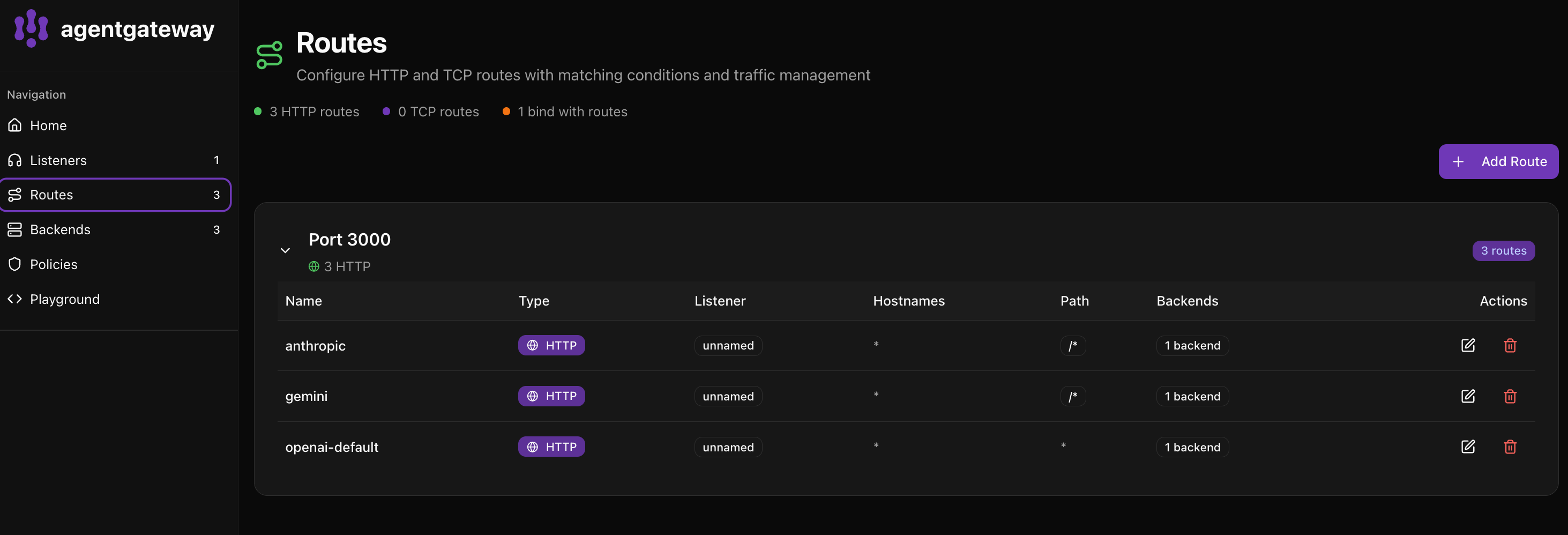
The UI shows:
- anthropic - Routes requests with
x-provider: anthropicheader - gemini - Routes requests with
x-provider: geminiheader - openai-default - Default route for all other requests
Click Backends to see all configured AI providers.
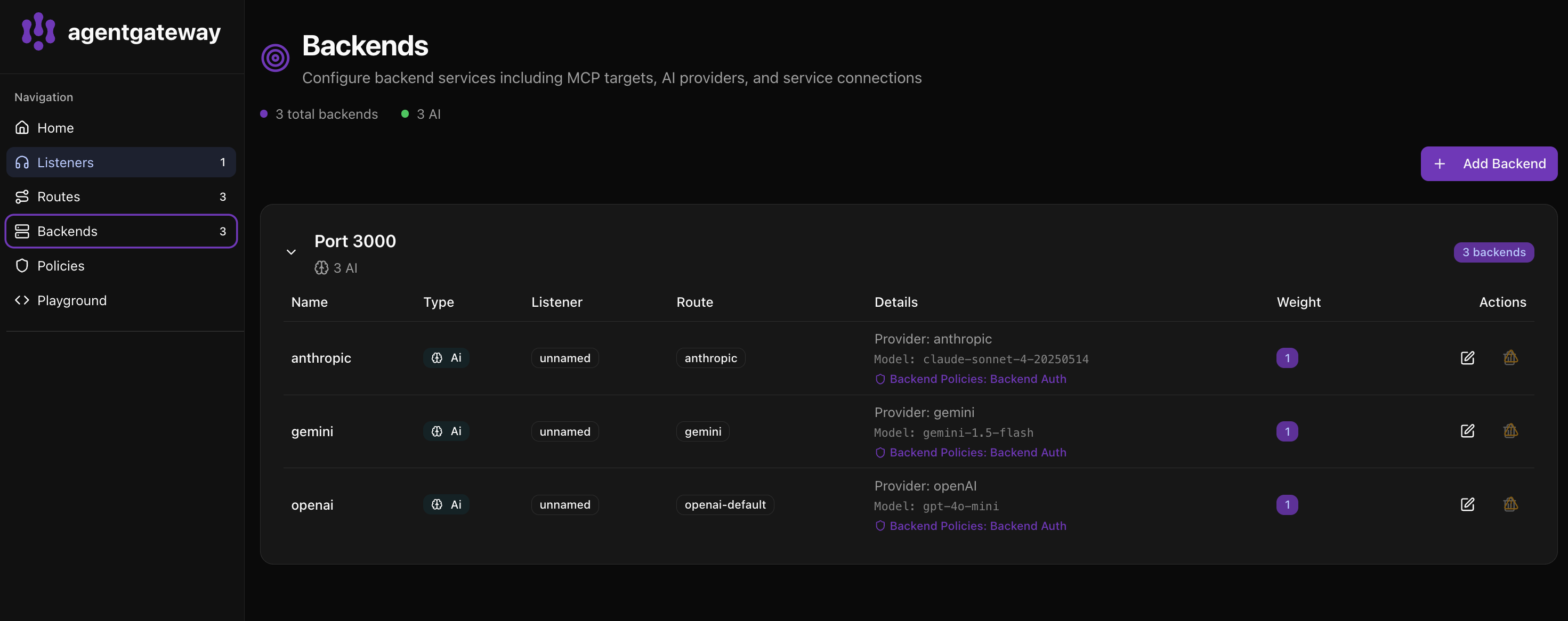
The Backends page shows:
- 3 total backends with 3 AI providers configured
- Each backend displays the provider, model, and policies
- You can see the route each backend is associated with
Step 5: Test each provider
Use Anthropic.
curl http://localhost:3000/v1/chat/completions \
  -H "Content-Type: application/json" \
  -H "x-provider: anthropic" \
  -d '{"model": "claude-sonnet-4-20250514", "messages": [{"role": "user", "content": "Hello!"}]}'
Use Gemini.
curl http://localhost:3000/v1/chat/completions \
  -H "Content-Type: application/json" \
  -H "x-provider: gemini" \
  -d '{"model": "gemini-2.0-flash", "messages": [{"role": "user", "content": "Hello!"}]}'
Use OpenAI (default, no header needed).
curl http://localhost:3000/v1/chat/completions \
  -H "Content-Type: application/json" \
  -d '{"model": "gpt-4.1-nano", "messages": [{"role": "user", "content": "Hello!"}]}'